
[ LAUNCHING_THE_PRIVATE_BROWSER ]
BVT BROWSER The private browser by BitVault Browse private. Browse fast.
- SHIELDS_UP
- TOR_TABS
- FREE_VPN
- HYBRID_50
- BVT_WALLET
- TRANSLATE_ON_PC
Your browser. Your keys. Your privacy.
BVT BROWSER is a fast Chromium browser that blocks ads and trackers, opens private Tor tabs, has a free VPN, runs up to 50 browsers at once, keeps a crypto wallet and translates pages on your own PC. Install it on Windows from an .exe, on Android from an .apk — or try the real interface right here.
WINDOWS 10/11 · ANDROID 9+ · NOT A CHROME EXTENSION · v1.9.0 · 125 MB
SCROLL_TO_ENTER[ /INSIDE ]
One browser. All of it.
Most people need four apps for this: a browser, an ad blocker, a VPN and a crypto wallet. BVT BROWSER puts them in one window, and keeps your data on your computer.
- 50
- browsers at onceHybrid opens up to 50 separate browsers, each with its own cookies and IP.
- 114
- translation directions57 languages to and from English, translated on your PC.
- 24
- filter listsEasyList, EasyPrivacy, uBlock lists and regional lists — you choose.
- 0
- pages sent to BitVaultHistory, pages, passwords and keys never leave your PC.
[ /FEATURES ]
Everything in one window
Here is what BVT BROWSER does, in plain words. The Windows app has all of it. The Android app has the browsing part.
- ON BY DEFAULT
SHIELDS
Ads and trackers blocked
BVT Shields stop ads, trackers and cookie banners before they load, on every site. You pick the filter lists. One click turns Shields off for a site that breaks.
24 listsYouTube adsper site PRIVATE
Private and Tor tabs
A private tab keeps no history and wipes its cookies when you close it. A private Tor tab sends the page through the Tor network, so the site does not see your IP address.
Ctrl+Shift+NTor insideVPN
Free VPN, built in
Switch the VPN on and the browser goes through Tor exits in the country you choose — free, no account with a VPN company. Or paste your own proxy servers.
free10 countriesown proxy- WINDOWS
HYBRID
50 browsers at once
Hybrid opens up to 50 separate browsers side by side. Each one has its own cookies — and its own IP address when the VPN is on. Move the mouse once, all of them follow.
50 clonesown IP each WALLET
BVT Wallet inside
A real crypto wallet: BVT, BRUSD and BRINR on BVM20, USDT and USDC on BNB Chain and Ethereum. The keys are made on your PC and locked with your passphrase.
BIP-39BVM20USDT · USDC- NEW IN 1.9
TRANSLATE
Translate pages on your PC
Read any page in your language. The translation runs on your own computer with Mozilla's open models — the text never goes to a translation server.
57 languageson this PC CONNECTIONS
Use two internet lines
Plug in Wi-Fi and a phone together and BVT spreads sites and big downloads over both. If one line drops, pages keep loading on the other.
Wi-Fi + phonebonded betaEXTENSIONS
Your extensions work
Install extensions from the Chrome Web Store or Microsoft Edge Add-ons with a link — and Safari extensions from a file. Each one shows how well it is supported.
Chrome storeEdge add-ons
[ /PRIVACY ]
Shields up on every site
Click the lion in the address bar and you see what was blocked on this page. Shields work in normal and private tabs.
- Ads and trackers are stopped before they download — pages load faster and use less data.
- Cookie banners hidden, cross-site cookies blocked, tracking words like utm_ removed from links.
- HTTPS first: BVT tries the secure version of every site. Secure DNS and Global Privacy Control are one switch away.
- Block element: right-click anything annoying and hide it for good. Write your own filter rules if you like.
- Forget this site when you close it — its cookies and storage are wiped, nothing else.
Honest note: the fingerprint protection works inside the page (JavaScript level), so a determined site can still notice it. Blocking YouTube ads is a race with YouTube — it can break when YouTube changes, and the lists are updated to catch up.
[ /TOR_AND_VPN ]
Tor tabs and a free VPN
Tor is built into BVT BROWSER. You do not install anything else and you do not pay a VPN company.
- Private Tor tab (Alt+Shift+N): the page goes through the Tor network. The site sees a Tor address, not yours.
- VPN switch: the whole browser goes through Tor exits. Pick a country — US, Germany, Netherlands, UK, Singapore, Japan, Canada, Switzerland, France — or Auto.
- New IP every 2, 5 or 10 minutes if you want, and the bottom bar always shows the IP sites really see.
- Your own servers: paste SOCKS5 or HTTP proxies and BVT uses them instead of Tor.
- Wallet traffic never goes through Tor or a free proxy — money moves on a direct, checked connection.
Honest note: the first Tor connection takes about 10–40 seconds. Tor exit addresses are public, so Google and some shops show picture tests more often. Private is not the same as anonymous — what you type into a site, the site still sees.
[ /TRANSLATE ]
Translation that stays on your PC
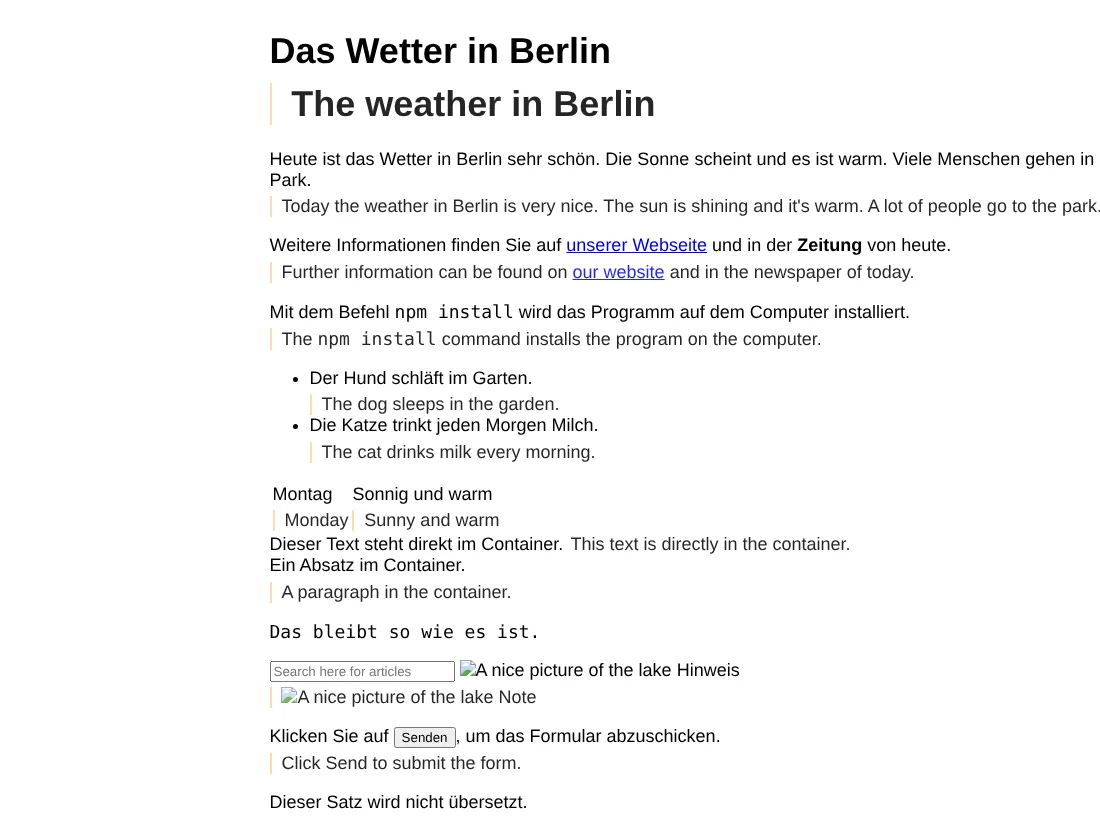
When a page is in another language, a button appears in the address bar. One click and the page is in your language.
- Runs on your computer with Mozilla's open translation models — the same engine as Firefox. The text is not sent to any server.
- 57 languages to and from English, and between any two of them through English.
- Each language downloads once (about 15–50 MB) from BitVault's server. Mozilla's server is used only if you say yes.
- Show both languages for learning, Show original puts the page back exactly as it was.
- Right-click any selected text → Translate selection.
Honest note: pages inside frames are not translated yet, and some sites that keep rewriting their own text can switch parts back. In Tor tabs and on pages with a password box, BVT never translates by itself.
[ /HYBRID ]
Hybrid: 50 browsers, one mouse
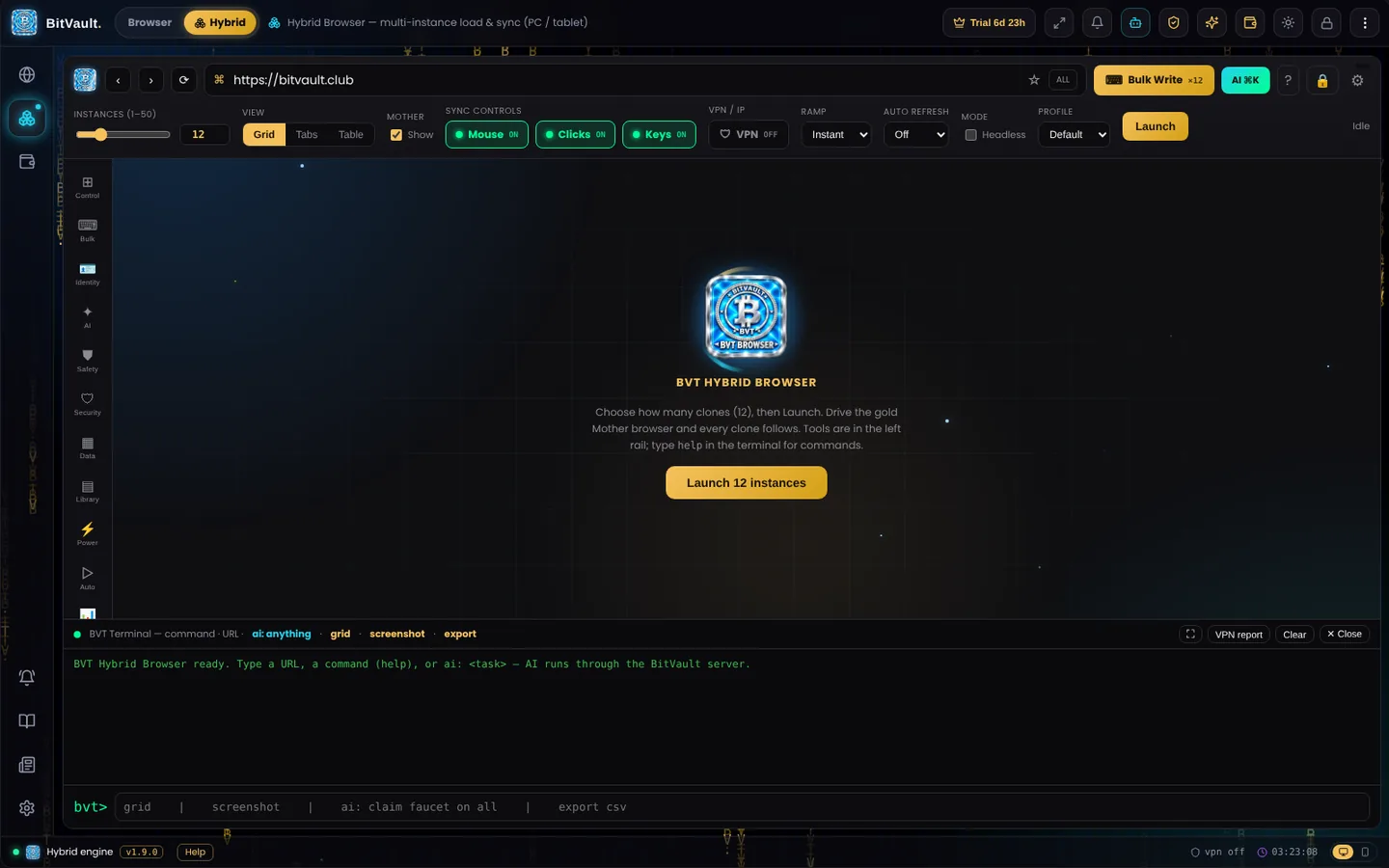
For people who manage many accounts, test websites or watch many pages at once.
- Up to 50 separate browsers in a grid. Each has its own cookies and logins — like 50 different computers.
- Own IP for each browser when the VPN is on, and the terminal prints every IP so you can check.
- Sync mode: move the mouse, click or type in the main browser and every clone does the same.
- Ramp (instant, 5, 10 or 25 per second) and auto refresh every 10, 20, 30 or 60 minutes.
- Memory guard: BVT never starts more pages than your PC's memory can hold — the rest wait in line.
Honest note: each open page needs about 80–300 MB of memory. On a 16 GB PC about 50 pages load at once; the others wait. Hybrid is for the Windows app, and you must follow each website's rules.
[ /WALLET ]
A wallet you control
The BVT Wallet lives inside the browser, but websites can never reach it.
- 12 recovery words (BIP-39) made on your PC. Keys are encrypted with your passphrase and Windows protection.
- Send and receive BVT, BRUSD and BRINR on BVM20, plus USDT and USDC on BNB Chain and Ethereum.
- Safety checks: passphrase on every send, full address shown in groups of four, warning for a new address, red block for look-alike addresses.
- Recovery words hidden from screenshots, clipboard wiped after 30 seconds, auto-lock when you step away.
Honest note: BitVault never sees your recovery words, passphrase or keys — so nobody, not even BitVault, can get them back if you lose them. Write the 12 words on paper. Swapping between coins is not in the wallet yet.
[ /MORE ]
Built like a real browser
The everyday things a browser must do well — and a few safety features most browsers do not have.
UPDATES
Signed automatic updates
BVT checks for updates about every 6 hours without sending any ID. Every update is signed and checked before it installs. Often only the changed parts download.
signedsmall updatesSECURITY
App lock and 2-step login
Lock the app with its own password, add a 6-digit code from an authenticator app, and see what really protects you in the Security Center.
TOTP 2FAapp lockHELP
Talk to a real person
The Help button opens a chat with the BitVault team for payments, plans and problems. Staff never ask for your recovery words or passwords — the chat even warns you.
live chatseed-safe
[ /SCREENS ]
The real app
These are real screens of BVT BROWSER v1.9.0 for Windows — not drawings. Click a tab.
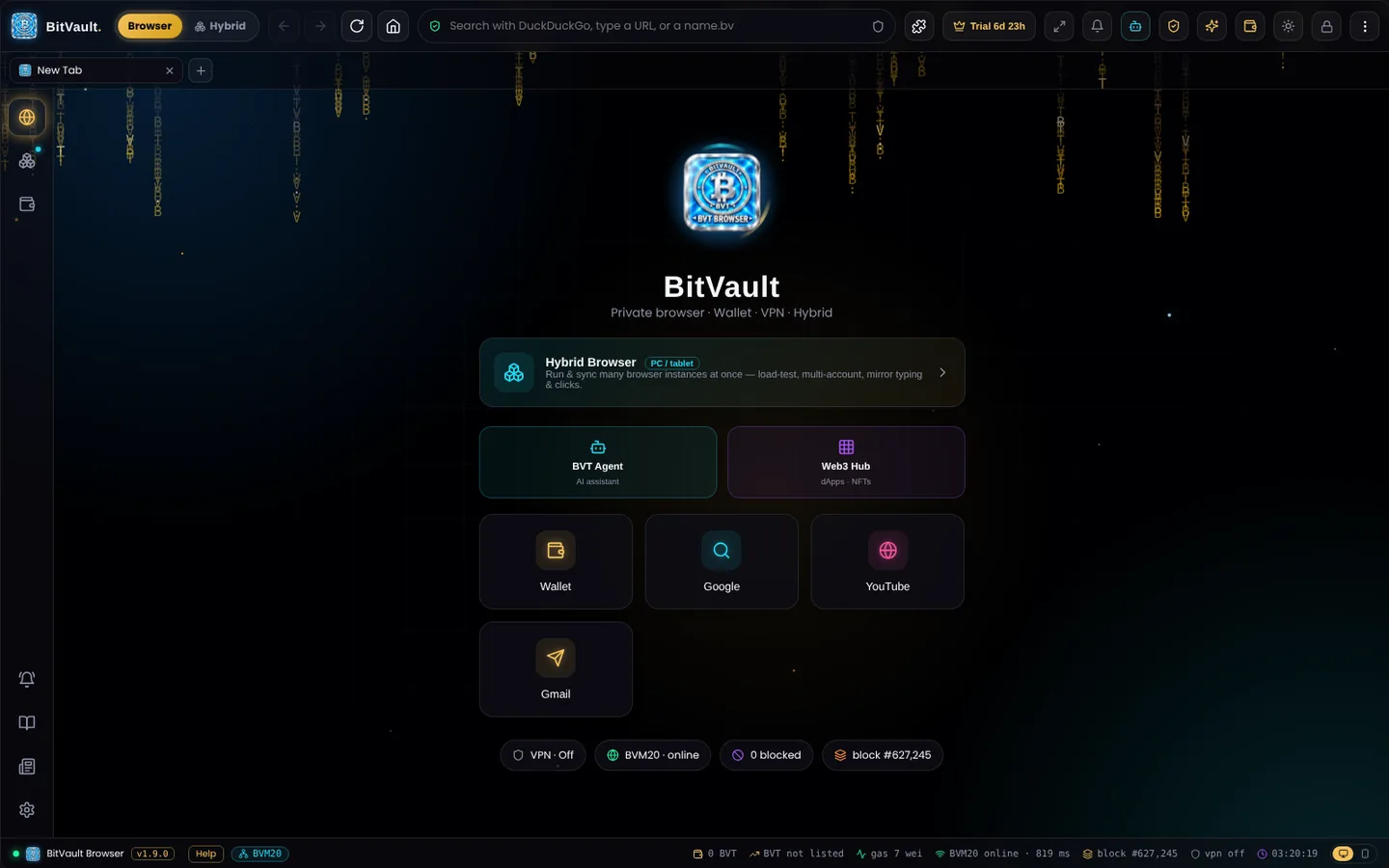
Want to click around yourself? Open the interactive preview — the real interface running in your web browser, with demo data.
[ /PLANS ]
Start free
Every new account starts with a free trial. Premium unlocks the full browser after that. You pay in USDT, inside the app.
7 days
5USDT
1 week of Premium
1 month
10USDT
30 days of Premium
3 months
25USDT
90 days of Premium
6 months
45USDT
180 days of Premium
1 year
75USDT
365 days of Premium
Free time first: a free trial on every new account, 1 month free when you sign in with Google or email, and 3 months free when your profile is complete.
Plans are paid in USDT on BNB Smart Chain (BEP-20) from the app's Premium page. The app shows the time left at all times.
BVT BROWSER for Android (Lite) is free. Prices can change; the app always shows the current price before you pay.
[ /PLATFORMS ]
Windows, Android, and a run option
Install it as a real app. BVT BROWSER is not a Chrome extension and does not need one.
- FULL
WINDOWS 10 / 11 · 64-BIT
Windows app (.exe)
The full browser with every feature on this page. One-click installer, no admin rights needed, updates itself.
Download .exe - LITE · FREE
ANDROID 9 OR NEWER
Android app (.apk)
A light, private browser for your phone: tabs, Shields, private tabs, HTTPS-first and downloads, in the same blue BVT look.
Download .apk - TRY NOW
ANY WEB BROWSER
Run in your browser
Open the real BVT BROWSER interface on this website and click through every screen. Demo data only — install the app for the real thing.
Run BVT BROWSER
There is no Chrome extension. BVT BROWSER is a whole browser of its own — Shields, Tor and the VPN are built into it.
[ /QUESTIONS ]
Questions and answers
Short, honest answers. Still unsure? Write to us below.
Is BVT BROWSER a Chrome extension?
No. BVT BROWSER is a full web browser of its own. You install it on Windows from an .exe file, or on an Android phone from an .apk file. There is nothing to add to Chrome.
Which computers and phones does it run on?
Windows 10 and Windows 11 (64-bit) with the full browser, and Android 9 or newer with BVT BROWSER for Android (Lite). You can also try the real interface in any web browser on the Run page.
What is the difference between the Windows app and the Android app?
The Windows app is the full browser: Shields, private and Tor tabs, free VPN, Hybrid, wallet, translator, extensions and more. The Android app is a lighter browser: tabs, Shields with a built-in block list, private tabs, HTTPS-first and downloads. Tor, VPN, Hybrid, wallet and translator are in the Windows app.
Is the VPN really free?
Yes. The built-in VPN uses the Tor network, which is free. The first connection takes about 10 to 40 seconds. Tor exit addresses are public, so some sites (Google, for example) may ask you to solve a picture test more often. You can also use your own proxy servers.
Does BitVault see my browsing?
No. Your history, the pages you open, your passwords and your wallet keys stay on your PC. The app never sends them to BitVault — there is no place on our servers to store them.
Is page translation private?
Yes. Translation runs on your own computer. The first time you translate a language, BVT downloads that language pack (about 15 to 50 MB) from BitVault's server, or from Mozilla only if you agree. After that, it works offline.
Why does Windows show a blue warning when I install it?
The installer is not yet signed with a paid code-signing certificate, so Windows SmartScreen shows "Windows protected your PC". Click More info, then Run anyway. Check the file first: its SHA-256 must match the number on the download page.
Why does Android say the app is unknown?
The APK comes from this website, not from Google Play, so Android asks before installing it and Play Protect may warn you. Allow installs from your browser, check the SHA-256, then tap Install anyway.
How much does it cost?
Every new account gets a free trial. Signing in with Google or email adds a free month, and a complete profile adds three free months. After that, plans start at 5 USDT for 7 days. The Android Lite app is free.
Can I keep using my extensions?
Many Chrome and Edge extensions work. Each extension shows a label — full, partial or limited — so you know before you rely on it.
How do updates work?
The browser checks about every 6 hours, downloads the update in the background and installs it when you close BVT. Every update is signed by BitVault and checked before it runs. The check sends no ID about you.
Who makes BVT BROWSER?
The BitVault Founding Team — the same team behind the BitVault blockchain, BVT and the BitVault apps. Write to support@bitvault.club with any question.
[ /CONTACT ]
Talk to us
Questions, business, press or a bug — send a message and the BitVault team replies by email. Already using the app? The Help button inside BVT BROWSER is the fastest way.